Introducing Call Simulation: Automated testing for voice AI

Mai Medhat
CEO & Co-founder @ Tuner
Manually calling your voice agent is nobody's favorite job, and it doesn't scale. Today we're changing that.
From day one, our mission has been to help teams ship reliable voice agents and keep improving them continuously. Today is a step forward.
If you build voice agents, you've called your own agent more times than you can count. You go through a few scenarios. It sounds fine. You ship. Three days later, a real customer hits an edge case you never thought to test, and you find out the worst way.
Real callers will always surprise you. The question is whether they surprise you in production, or in simulation first.
Manual testing only covers the happy path. You test the flows you know. But your agent will handle thousands of conversations, frustrated callers, edge cases, out-of-scope questions, callers who change their mind mid-sentence. You can't dial your way to confidence. You need to automate it.
That's why we're introducing Call Simulation. Run hundreds of Simulation Runs automatically, stress-test your agent across every scenario, and never manually call your agent again.
How Call Simulation works
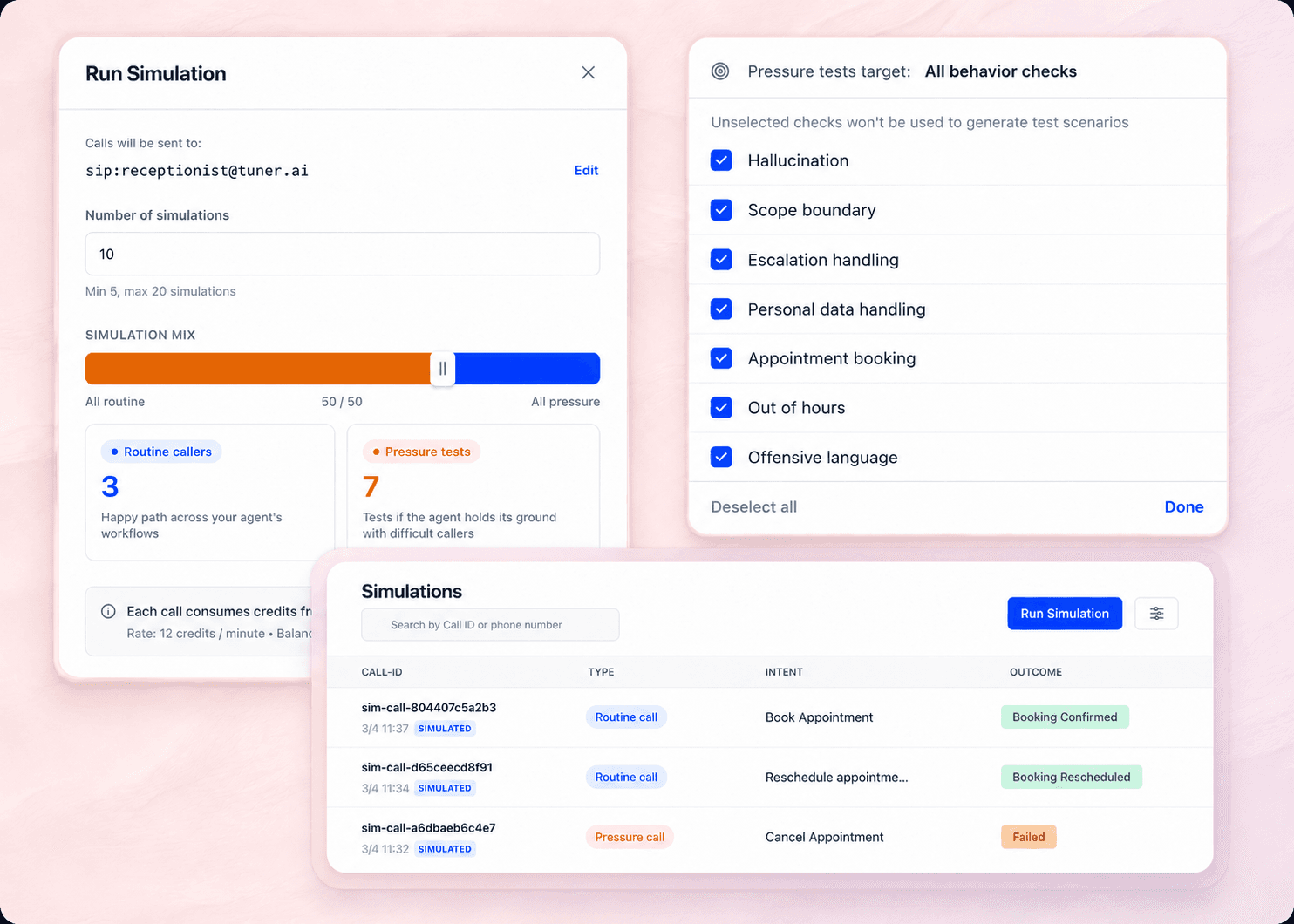
You configure a Simulation Run, choose your scenarios, set the scale, and let AI Callers do the work. They dial your voice agent, each one playing out a different Test Scenario. Every call is real: voice in, voice out, against your live agent or a staging version.
Run 20 calls. Run 500. It doesn't matter. Every single one happens automatically, no human dialing required.
You control the shape of every run with the Simulation Mix; a slider between two caller types:
Routine Callers: Run your agent through real-world workflows mapped directly to your configured Intents. The everyday calls your agent was built to handle — covered systematically.
Pressure Tests: Adversarial callers designed to find the edges. Hallucination attempts, scope violations, escalation triggers, offensive language. The conversations you hope never happen — tested before they do.
Slide toward all-routine to validate your core workflows. Slide toward all-pressure to stress-test before a big change. Or find the ratio that fits where you are. You're in control of every Simulation Run.
Scored against your production evals, automatically
There's no separate scoring setup for simulation. Every Simulation Call is evaluated against the same Call Outcomes, Intents, and Evals you already built for your live agent.
Failures surface exactly the way they would in production. If your agent is supposed to book an appointment and doesn't, that's a Failure in simulation just like it would be in your live dashboard. If 40% of your Pressure Tests are failing a specific Eval, you know exactly what to fix before a real caller ever hears it.
Call Simulation scores against the standards your agent is already held to in production. It's a full dress rehearsal, same evals, same detection, same bar.
Run it after every change
Call Simulation isn't just a pre-launch gate. Voice agents break in subtle ways, a small prompt change can surface failures you'd never anticipate. Run a Simulation Run after every change you make: prompt updates, model upgrades, new integrations, workflow changes.
The feedback loop is fast. Configure, run, review the Simulation Report, fix what's broken. Ship with confidence. Every time.
What you'll catch
Call Simulation isn't just about catching broken call flows. Because every Simulation Call is a real voice conversation run through your full stack, you get signal on dimensions that manual testing almost never covers. Like:
Latency: Measure how fast your agent responds under real call conditions. Catch regressions after model or infrastructure changes before they affect real callers.
Tool Calling: Validate that your agent invokes the right tools at the right moments: booking systems, lookups, handoffs. Confirm they fire correctly across every scenario type.
Agent Reasoning: See how your agent thinks through ambiguous or multi-step situations. Does it ask the right clarifying questions? Does it follow the right path when the caller goes off-script?
Scenario Handling: Test how your agent holds up across edge cases: frustrated callers, out-of-scope requests, mid-call changes of mind. Know exactly where it holds and where it breaks.
The Simulation Report surfaces all of this in one place — not as raw logs you have to dig through, but as structured signal mapped to the Evals and Call Outcomes you already care about.
Building the reliability layer for Voice AI
We believe voice AI needs the same infrastructure that software engineering has had for decades — automated testing, continuous monitoring, observable production systems. Call Simulation is a core part of that foundation.
Manually calling your voice agent is nobody's favorite job, and it doesn't scale. Today we're changing that.
From day one, our mission has been to help teams ship reliable voice agents and keep improving them continuously. Today is a step forward.
If you build voice agents, you've called your own agent more times than you can count. You go through a few scenarios. It sounds fine. You ship. Three days later, a real customer hits an edge case you never thought to test, and you find out the worst way.
Real callers will always surprise you. The question is whether they surprise you in production, or in simulation first.
Manual testing only covers the happy path. You test the flows you know. But your agent will handle thousands of conversations, frustrated callers, edge cases, out-of-scope questions, callers who change their mind mid-sentence. You can't dial your way to confidence. You need to automate it.
That's why we're introducing Call Simulation. Run hundreds of Simulation Runs automatically, stress-test your agent across every scenario, and never manually call your agent again.
How Call Simulation works
You configure a Simulation Run, choose your scenarios, set the scale, and let AI Callers do the work. They dial your voice agent, each one playing out a different Test Scenario. Every call is real: voice in, voice out, against your live agent or a staging version.
Run 20 calls. Run 500. It doesn't matter. Every single one happens automatically, no human dialing required.
You control the shape of every run with the Simulation Mix; a slider between two caller types:
Routine Callers: Run your agent through real-world workflows mapped directly to your configured Intents. The everyday calls your agent was built to handle — covered systematically.
Pressure Tests: Adversarial callers designed to find the edges. Hallucination attempts, scope violations, escalation triggers, offensive language. The conversations you hope never happen — tested before they do.
Slide toward all-routine to validate your core workflows. Slide toward all-pressure to stress-test before a big change. Or find the ratio that fits where you are. You're in control of every Simulation Run.
Scored against your production evals, automatically
There's no separate scoring setup for simulation. Every Simulation Call is evaluated against the same Call Outcomes, Intents, and Evals you already built for your live agent.
Failures surface exactly the way they would in production. If your agent is supposed to book an appointment and doesn't, that's a Failure in simulation just like it would be in your live dashboard. If 40% of your Pressure Tests are failing a specific Eval, you know exactly what to fix before a real caller ever hears it.
Call Simulation scores against the standards your agent is already held to in production. It's a full dress rehearsal, same evals, same detection, same bar.
Run it after every change
Call Simulation isn't just a pre-launch gate. Voice agents break in subtle ways, a small prompt change can surface failures you'd never anticipate. Run a Simulation Run after every change you make: prompt updates, model upgrades, new integrations, workflow changes.
The feedback loop is fast. Configure, run, review the Simulation Report, fix what's broken. Ship with confidence. Every time.
What you'll catch
Call Simulation isn't just about catching broken call flows. Because every Simulation Call is a real voice conversation run through your full stack, you get signal on dimensions that manual testing almost never covers. Like:
Latency: Measure how fast your agent responds under real call conditions. Catch regressions after model or infrastructure changes before they affect real callers.
Tool Calling: Validate that your agent invokes the right tools at the right moments: booking systems, lookups, handoffs. Confirm they fire correctly across every scenario type.
Agent Reasoning: See how your agent thinks through ambiguous or multi-step situations. Does it ask the right clarifying questions? Does it follow the right path when the caller goes off-script?
Scenario Handling: Test how your agent holds up across edge cases: frustrated callers, out-of-scope requests, mid-call changes of mind. Know exactly where it holds and where it breaks.
The Simulation Report surfaces all of this in one place — not as raw logs you have to dig through, but as structured signal mapped to the Evals and Call Outcomes you already care about.
Building the reliability layer for Voice AI
We believe voice AI needs the same infrastructure that software engineering has had for decades — automated testing, continuous monitoring, observable production systems. Call Simulation is a core part of that foundation.