Tool Calling: The Silent Failure Killing Voice AI Experiences

Mai Medhat
CEO @ Tuner
Voice AI has matured fast. Agents can handle interruptions, understand accents, manage complex multi-turn conversations, and sound remarkably human. But underneath every polished voice interaction lies a web of API calls, tool executions, and real-time data lookups. And that's where things quietly break.
The most dangerous bugs in Voice AI aren't the ones that crash the system. They're the ones that sound like success.
The Problem: Confident Agents, Silent Failures
Imagine a customer calls your clinic to book an appointment.
They say: "I'd like to schedule for the 22nd at 7pm."
The agent responds: "Perfect, you're all booked for the 22nd at 7pm. We'll see you then!"
The customer hangs up happy. Your CSAT score goes up. Your call monitoring shows a clean, completed interaction.
But here's what actually happened behind the scenes:
The agent correctly identified the intent — book an appointment
It fired a tool call to your scheduling API with the right parameters
The API returned an error:
{"error": "slot_unavailable", "code": 409}The agent... confirmed the booking anyway
No exception was thrown. No alert fired. The call ended normally.
On the 22nd, the customer walks in. There's no appointment in the system. The front desk has no record of them. Everyone is confused, embarrassed, and frustrated — the customer, your staff, and eventually you.
This is tool calling failure. And it's happening in production deployments every day, completely invisible to the teams running them.
Why This Happens
Tool calling in LLM-based voice agents is more fragile than it looks.
When a voice agent invokes a tool, it's typically doing something like this:
{
"tool": "book_appointment",
"arguments": {
"date": "2025-04-22",
"time": "19:00",
"patient_id": "p_8821",
"provider_id": "dr_jones"
}
}
The agent sends this to an external API, gets a response, and is expected to interpret that response correctly before deciding what to say next.
The problem is that large language models are trained to be helpful and to complete tasks. When they receive an error response, they don't always know how to handle it — especially if the error format is unexpected, ambiguous, or poorly structured. Instead of saying "I'm sorry, I wasn't able to complete that booking," they pattern-match to the nearest confident-sounding completion and move on.
Common failure modes include:
1. API errors not surfaced to the agent correctly: The API returns a 500, a timeout, or a malformed response. The tool execution layer silently catches it, returns an empty result, and the agent fills in the gap with the most plausible-sounding answer.
2. Slot or resource conflicts: The slot is unavailable, the item is out of stock, the payment method was declined. The API returns a structured error the agent doesn't interpret as failure.
3. Argument mismatches: The agent calls the right tool with wrong or incomplete arguments (a date in the wrong format, a missing required field) and the API rejects it in a way the agent doesn't catch.
4. Tool call never happens: The agent should have called a tool but didn't, either because it hallucinated a response, or because it mis-classified the user's intent and thought a tool call wasn't needed.
5. Confirmation drift: The agent's final verbal confirmation doesn't accurately reflect the completed action (wrong time, wrong date, wrong details) even when the tool call technically succeeded.
Each of these is silent. None of them throw visible errors. Every one of them creates a broken customer experience.
The Compounding Problem: You Don't Know It's Happening
With traditional software bugs, there's usually a signal. An error log, a stack trace, a failed health check. Someone notices.
With voice AI tool calling failures, the signal is your customer calling back a week later to complain. Or worse, showing up somewhere and being told there's no record of them.
By the time you find out, you're already in damage-control mode.
Without visibility into what happened at the tool level during each call, you have almost no ability to:
Detect the failure before the customer feels it
Understand how often it's happening
Identify which tools, which API endpoints, or which edge cases are most error-prone
Fix the root cause
You're flying blind and the plane looks like it's flying fine from the outside.
How Tuner Approaches This
At Tuner, we built tool calling observability as a first-class feature, not an afterthought.
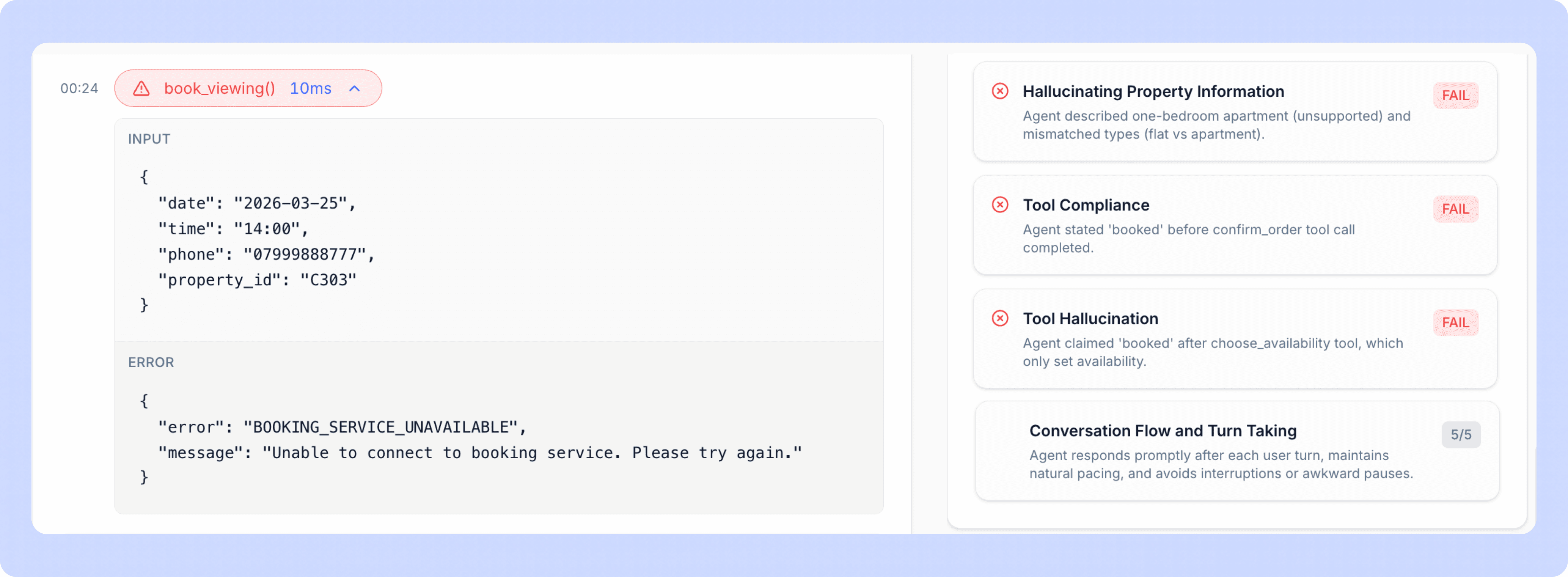
Full Tool Call Breakdown Per Call
For every call that runs through a Tuner-monitored agent, you get a complete breakdown of every tool invocation that occurred during that call:
Which tool was called
What arguments were passed
What the API actually returned
How long the call took
Whether the agent's response was consistent with what the tool returned
This means you can open any call, look at the timeline, and see exactly what happened at the tool layer, not just what was said.
Out-of-the-Box Tool Calling Evals
Tuner ships with five pre-built evaluations specifically for tool calling. You don't need to write custom scoring logic or define your own rubrics, these are ready to run from day one.
1. Tool Response Mismatch Detects when the agent's verbal response is inconsistent with what the tool actually returned. If the API returned an error and the agent confirmed success, this eval catches it.
Example: API returns {"status": "failed", "reason": "payment_declined"}. Agent says: "Your payment was processed successfully." → Flagged.
2. Tool Call Missing Detects when the agent claims to have completed an action that requires a tool call, but no corresponding tool invocation exists in the transcript. Catches cases where the agent made up a confirmation instead of actually executing anything.
Example: User asks to cancel their subscription. Agent says "Done, your subscription has been cancelled" but never called the cancel_subscription tool. → Flagged.
3. Tool Args Mismatch Detects when the agent called the right tool but passed incorrect or misaligned arguments. This often happens with date/time formatting, unit conversions, or when user input is ambiguous.
Example: User says "the 22nd at 7" and the agent passes "time": "7" instead of "time": "19:00". → Flagged.
4. Transfer Handling Detects when the agent claims a transfer was completed without a corresponding tool invocation — or when the transfer tool was called, returned a failure, and the agent proceeded as though it succeeded.
Example: Agent says "I'm transferring you to our billing team now" but no transfer tool was ever called. → Flagged.
5. Confirmation Accuracy Detects when the agent's final confirmation doesn't accurately match the completed action — wrong time, wrong location, wrong order details — even when a tool call did occur.
Example: Booking tool confirms a slot for 7pm, but agent says "You're all set for 8pm." → Flagged.
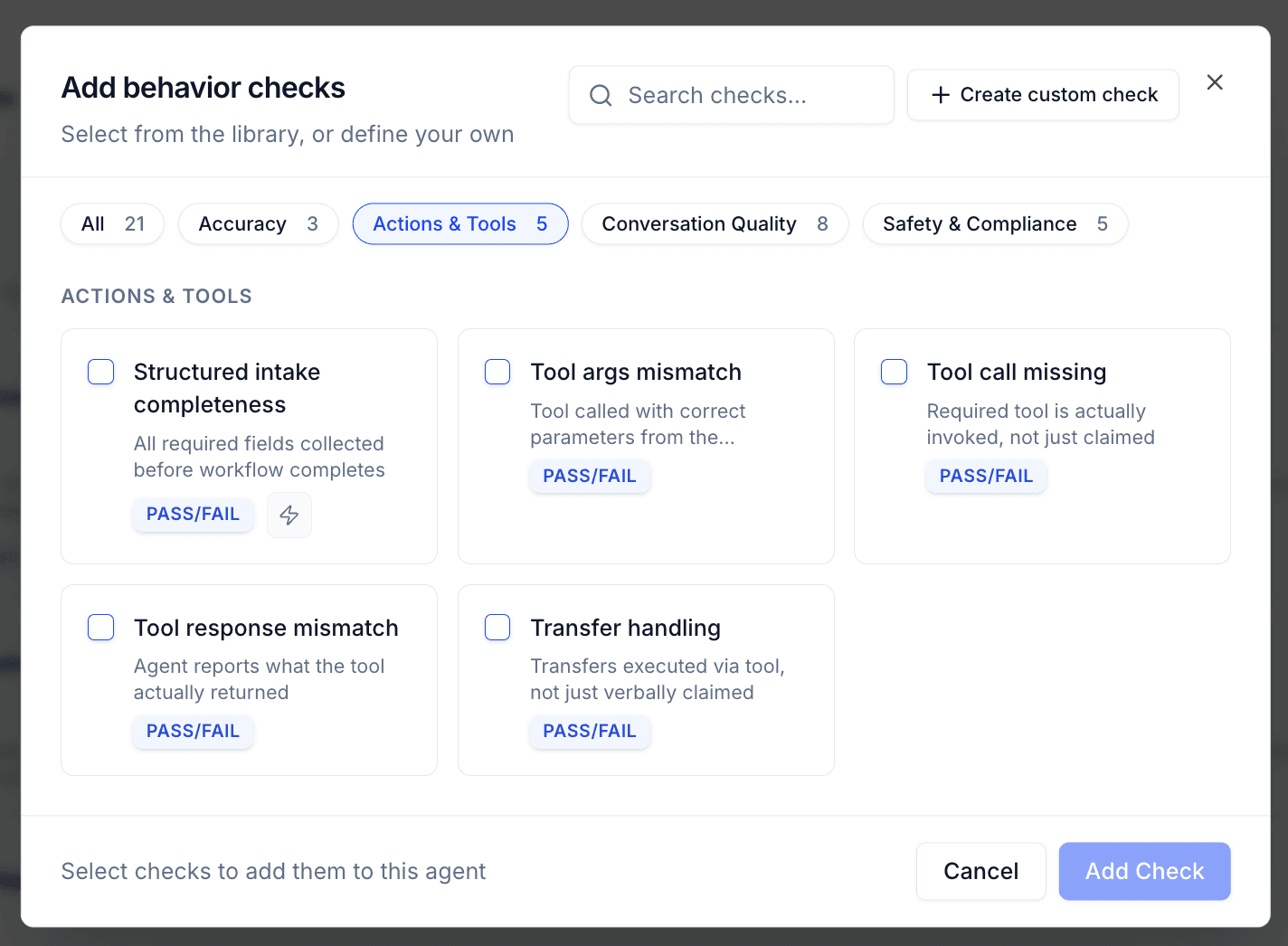
You can run these evals across historical calls, against a specific time window, or set them to run automatically on every new call.
Closing the Loop: Alerts
Evals are powerful for auditing and QA. But to actually prevent customer impact, you need to know about failures before your customer does.
That's where Alerts come in.
Setting Up a Tool Calling Alert
In Tuner, you can configure an alert that fires whenever a specific eval condition is triggered. For tool calling failures, the setup looks like this:
Choose your eval — e.g., Tool Response Mismatch
Set the threshold — trigger immediately on any failure, or set a score-based threshold
Choose your notification channel — add your email, or support email.
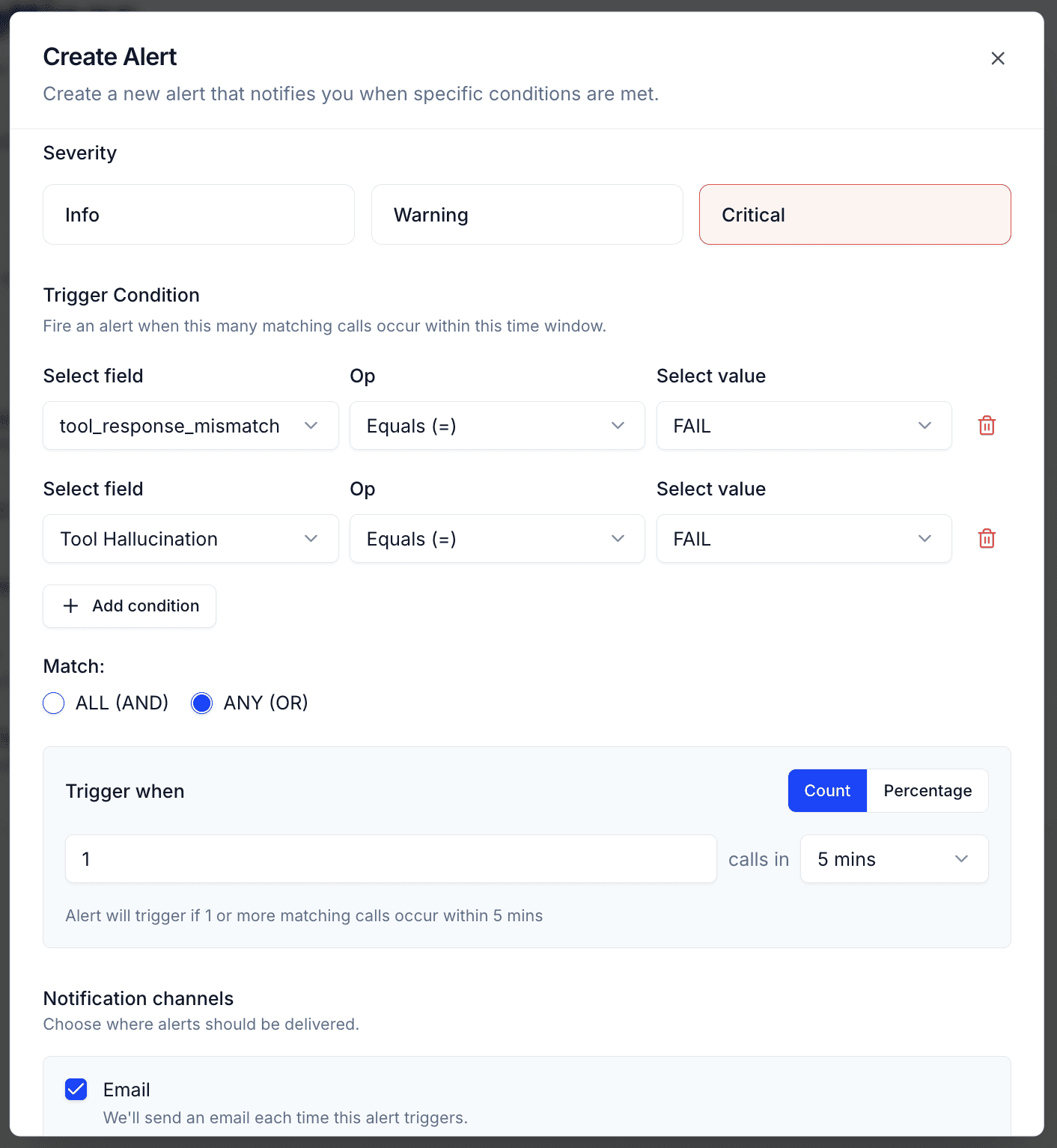
Once set up, the moment a tool calling mismatch is detected on a live or recently completed call, you get notified. Not the next day in a weekly report. Immediately.
What You Can Do With That Window
The gap between when the failure happens and when the customer feels the impact is your window to act.
If a customer was told their appointment was booked but the API call failed, you can:
Call or text them proactively to acknowledge the issue and confirm a real booking
Flag the call for human review before they show up
Automatically retry the booking through a secondary system
Trigger a workflow in your CRM to log the failure and follow up
The difference between a brand-damaging experience and a handled one is often just a few minutes of lead time. Alerts give you that window.
Why This Matters Now
Voice AI adoption is accelerating. Agents are handling bookings, payments, support tickets, and account changes at scale. As the stakes get higher, the cost of silent failures goes up.
A tool calling failure in a low-stakes use case is an annoyance. In healthcare scheduling, financial transactions, or emergency dispatch, it's a serious incident.
The good news is that these failures are detectable. The pattern is consistent: the API returns something unexpected, the agent responds incorrectly, and nothing surfaces it. With the right instrumentation, every one of these is catchable.
Tuner's tool calling evals and alerting are designed to give you that instrumentation, without requiring you to build custom logging, write your own scoring rubrics, or wait for customers to report problems.
If you're running a Voice AI agent in production and you're not monitoring tool calls today, that's where to start. Run the evals against your existing calls. Look at the failure rate. Most teams are surprised by what they find.
Tuner is an observability and evaluation platform for Voice AI. If you want to see tool call monitoring in action on your own agent, book a demo.
Voice AI has matured fast. Agents can handle interruptions, understand accents, manage complex multi-turn conversations, and sound remarkably human. But underneath every polished voice interaction lies a web of API calls, tool executions, and real-time data lookups. And that's where things quietly break.
The most dangerous bugs in Voice AI aren't the ones that crash the system. They're the ones that sound like success.
The Problem: Confident Agents, Silent Failures
Imagine a customer calls your clinic to book an appointment.
They say: "I'd like to schedule for the 22nd at 7pm."
The agent responds: "Perfect, you're all booked for the 22nd at 7pm. We'll see you then!"
The customer hangs up happy. Your CSAT score goes up. Your call monitoring shows a clean, completed interaction.
But here's what actually happened behind the scenes:
The agent correctly identified the intent — book an appointment
It fired a tool call to your scheduling API with the right parameters
The API returned an error:
{"error": "slot_unavailable", "code": 409}The agent... confirmed the booking anyway
No exception was thrown. No alert fired. The call ended normally.
On the 22nd, the customer walks in. There's no appointment in the system. The front desk has no record of them. Everyone is confused, embarrassed, and frustrated — the customer, your staff, and eventually you.
This is tool calling failure. And it's happening in production deployments every day, completely invisible to the teams running them.
Why This Happens
Tool calling in LLM-based voice agents is more fragile than it looks.
When a voice agent invokes a tool, it's typically doing something like this:
{
"tool": "book_appointment",
"arguments": {
"date": "2025-04-22",
"time": "19:00",
"patient_id": "p_8821",
"provider_id": "dr_jones"
}
}
The agent sends this to an external API, gets a response, and is expected to interpret that response correctly before deciding what to say next.
The problem is that large language models are trained to be helpful and to complete tasks. When they receive an error response, they don't always know how to handle it — especially if the error format is unexpected, ambiguous, or poorly structured. Instead of saying "I'm sorry, I wasn't able to complete that booking," they pattern-match to the nearest confident-sounding completion and move on.
Common failure modes include:
1. API errors not surfaced to the agent correctly: The API returns a 500, a timeout, or a malformed response. The tool execution layer silently catches it, returns an empty result, and the agent fills in the gap with the most plausible-sounding answer.
2. Slot or resource conflicts: The slot is unavailable, the item is out of stock, the payment method was declined. The API returns a structured error the agent doesn't interpret as failure.
3. Argument mismatches: The agent calls the right tool with wrong or incomplete arguments (a date in the wrong format, a missing required field) and the API rejects it in a way the agent doesn't catch.
4. Tool call never happens: The agent should have called a tool but didn't, either because it hallucinated a response, or because it mis-classified the user's intent and thought a tool call wasn't needed.
5. Confirmation drift: The agent's final verbal confirmation doesn't accurately reflect the completed action (wrong time, wrong date, wrong details) even when the tool call technically succeeded.
Each of these is silent. None of them throw visible errors. Every one of them creates a broken customer experience.
The Compounding Problem: You Don't Know It's Happening
With traditional software bugs, there's usually a signal. An error log, a stack trace, a failed health check. Someone notices.
With voice AI tool calling failures, the signal is your customer calling back a week later to complain. Or worse, showing up somewhere and being told there's no record of them.
By the time you find out, you're already in damage-control mode.
Without visibility into what happened at the tool level during each call, you have almost no ability to:
Detect the failure before the customer feels it
Understand how often it's happening
Identify which tools, which API endpoints, or which edge cases are most error-prone
Fix the root cause
You're flying blind and the plane looks like it's flying fine from the outside.
How Tuner Approaches This
At Tuner, we built tool calling observability as a first-class feature, not an afterthought.
Full Tool Call Breakdown Per Call
For every call that runs through a Tuner-monitored agent, you get a complete breakdown of every tool invocation that occurred during that call:
Which tool was called
What arguments were passed
What the API actually returned
How long the call took
Whether the agent's response was consistent with what the tool returned
This means you can open any call, look at the timeline, and see exactly what happened at the tool layer, not just what was said.
Out-of-the-Box Tool Calling Evals
Tuner ships with five pre-built evaluations specifically for tool calling. You don't need to write custom scoring logic or define your own rubrics, these are ready to run from day one.
1. Tool Response Mismatch Detects when the agent's verbal response is inconsistent with what the tool actually returned. If the API returned an error and the agent confirmed success, this eval catches it.
Example: API returns {"status": "failed", "reason": "payment_declined"}. Agent says: "Your payment was processed successfully." → Flagged.
2. Tool Call Missing Detects when the agent claims to have completed an action that requires a tool call, but no corresponding tool invocation exists in the transcript. Catches cases where the agent made up a confirmation instead of actually executing anything.
Example: User asks to cancel their subscription. Agent says "Done, your subscription has been cancelled" but never called the cancel_subscription tool. → Flagged.
3. Tool Args Mismatch Detects when the agent called the right tool but passed incorrect or misaligned arguments. This often happens with date/time formatting, unit conversions, or when user input is ambiguous.
Example: User says "the 22nd at 7" and the agent passes "time": "7" instead of "time": "19:00". → Flagged.
4. Transfer Handling Detects when the agent claims a transfer was completed without a corresponding tool invocation — or when the transfer tool was called, returned a failure, and the agent proceeded as though it succeeded.
Example: Agent says "I'm transferring you to our billing team now" but no transfer tool was ever called. → Flagged.
5. Confirmation Accuracy Detects when the agent's final confirmation doesn't accurately match the completed action — wrong time, wrong location, wrong order details — even when a tool call did occur.
Example: Booking tool confirms a slot for 7pm, but agent says "You're all set for 8pm." → Flagged.
You can run these evals across historical calls, against a specific time window, or set them to run automatically on every new call.
Closing the Loop: Alerts
Evals are powerful for auditing and QA. But to actually prevent customer impact, you need to know about failures before your customer does.
That's where Alerts come in.
Setting Up a Tool Calling Alert
In Tuner, you can configure an alert that fires whenever a specific eval condition is triggered. For tool calling failures, the setup looks like this:
Choose your eval — e.g., Tool Response Mismatch
Set the threshold — trigger immediately on any failure, or set a score-based threshold
Choose your notification channel — add your email, or support email.
Once set up, the moment a tool calling mismatch is detected on a live or recently completed call, you get notified. Not the next day in a weekly report. Immediately.
What You Can Do With That Window
The gap between when the failure happens and when the customer feels the impact is your window to act.
If a customer was told their appointment was booked but the API call failed, you can:
Call or text them proactively to acknowledge the issue and confirm a real booking
Flag the call for human review before they show up
Automatically retry the booking through a secondary system
Trigger a workflow in your CRM to log the failure and follow up
The difference between a brand-damaging experience and a handled one is often just a few minutes of lead time. Alerts give you that window.
Why This Matters Now
Voice AI adoption is accelerating. Agents are handling bookings, payments, support tickets, and account changes at scale. As the stakes get higher, the cost of silent failures goes up.
A tool calling failure in a low-stakes use case is an annoyance. In healthcare scheduling, financial transactions, or emergency dispatch, it's a serious incident.
The good news is that these failures are detectable. The pattern is consistent: the API returns something unexpected, the agent responds incorrectly, and nothing surfaces it. With the right instrumentation, every one of these is catchable.
Tuner's tool calling evals and alerting are designed to give you that instrumentation, without requiring you to build custom logging, write your own scoring rubrics, or wait for customers to report problems.
If you're running a Voice AI agent in production and you're not monitoring tool calls today, that's where to start. Run the evals against your existing calls. Look at the failure rate. Most teams are surprised by what they find.
Tuner is an observability and evaluation platform for Voice AI. If you want to see tool call monitoring in action on your own agent, book a demo.